Getting started

Most of the work happens before anyone joins. Budget twenty minutes the day before, and the meeting itself is something you glance at.

1. Install from the Zoom Marketplace

Click Add on the RollCall Live listing and approve the requested permissions. You'll be redirected straight to your private board.

2. Confirm the account, then save your access codes

Before showing anything, the setup screen tells you which Zoom account authorized the install and asks you to confirm it's the one you meant. If it isn't, choose That's not me — nothing is saved to your browser. This matters because an install started from Zoom's own Marketplace button can complete against whichever Zoom account your browser is signed into, which isn't always the one your Zoom desktop app is showing.

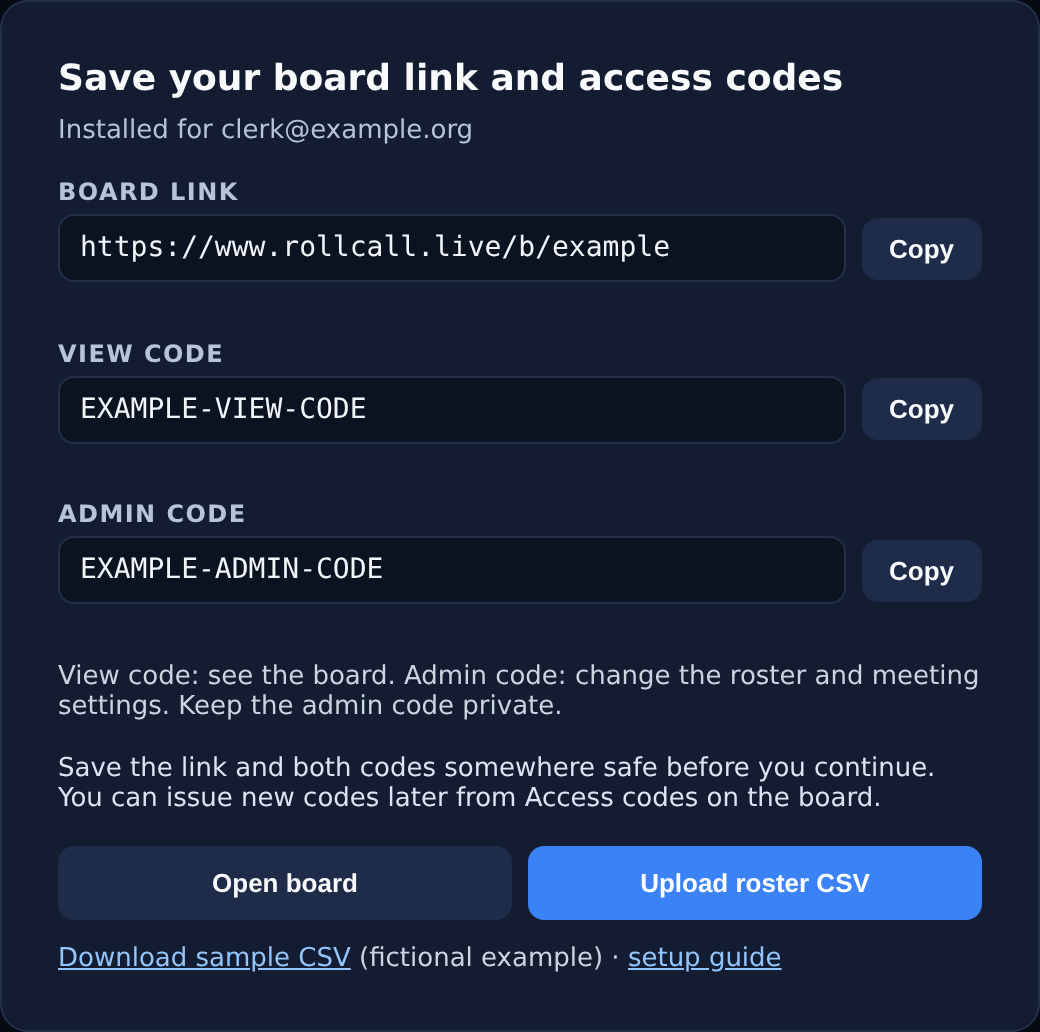
Once you confirm, the board shows your view code and admin code — one time only, so save them somewhere safe. Share the view code with anyone who should see the board (clerks, scrutineers); keep the admin code to yourself, since it's what allows changes to the roster, the proxies and the quorum figure.

2a. If someone else set the board up

A RollCall board belongs to the whole Zoom account, not to one person. If a colleague already installed it, installing again doesn't create a second board and won't show you the codes — you'll be told to ask whoever set it up. That's deliberate: the admin code controls the quorum count.

2b. Changing your codes

If a code has been shared too widely, seen over a screen share, or you just want to retire it, click Access codes on the board and issue a new pair. Your roster, proxies, attendance log and frozen rolls are untouched — but every other device signed in to the board will need the new code, including any view links you've sent out.

If you've lost the admin code entirely and can't get in at all, the only route back is to uninstall and reinstall from the Zoom Marketplace. That purges the account and starts you fresh, so export anything you need first.

2c. Sharing the board with someone else

The quickest way to give a clerk or scrutineer access is the Copy view link button on the board. It copies a link that opens the board already unlocked, so nobody has to type a code. Treat it like the code itself — anyone with the link can watch the roll call, so send it directly to the people who should see it, not to a public channel. The code travels in the part of the URL browsers never send to a server, and disappears from the address bar the moment the page opens.

3. Open your board

Your board lives at the link shown after install (rollcall.live/b/<your-account>). Bookmark it. Anyone opening it is asked for the view code.

4. Upload the membership roll

A CSV with names, emails, and roles (Voter / Observer / Guest), plus any extra columns you care about like Region or Chapter. Only Voters count toward quorum.

If your governing documents count proxies or ballots, or bar some members from voting, you can add Proxy, Ballot and Eligible columns now — or leave them out and record them from the board later. See the roster guide for the format.

5. Decide how members will be identified

This is the step people skip and regret. Zoom doesn't give apps the email address of anyone outside your own Zoom account — which is most of your membership — so without one, matching falls back to exact names and "Cathy's iPad" lands in Unmatched. There are four ways to get emails through and picking one takes about five minutes: see identifying your members. Turning on a waiting room is the other half of the answer.

6. Record proxies and ballots

Click Proxies & roster on the board. Search for a member and type who holds their proxy, or tick Ballot, or untick Eligible for someone in arrears. There's also a bulk paste for a list of member, proxy holder pairs, which is faster when you're working through a stack of forms.

You can do this right up to and during the meeting — proxies handed in at 6:45 PM are the normal case, not the exception. Every change is timestamped in the attendance log.

7. Set your quorum threshold

Click the quorum tile and enter the number your bylaws require. Do this in advance: computing it under pressure while people wait is how errors get into the minutes.

Once the meeting starts, the tile shows the composition — how many are present, by proxy, and by ballot — not just a total. If a proxy holder carrying several proxies leaves the call, the count drops immediately and the tile marks quorum as lost. That's deliberate: quorum has to be maintained, not just reached.

8. Start your Zoom meeting

Start the meeting on the Zoom account that installed the app. Participants appear on the board within seconds of joining and are classified against your roster automatically — no button pressing needed. Anyone the board can't place shows in Unmatched with a suggested match you can confirm in one tap. (On Zoom Business+ plans, admins also get a Sync from Zoom button to pull in anyone who joined before tracking started.)

9. Freeze the roll when a motion is put

Click Freeze roll at the moment a vote is called — not before, not after. It captures who was counted and on what basis: present, by proxy, by ballot, or excluded as ineligible.

10. Export for the meeting file

After the meeting, export the attendance log, per-person durations, every frozen roll, and the quorum record — the per-member breakdown showing how each person was counted. That last one is what lets someone reconstruct the total line by line if a decision is ever challenged.

Quorum thresholds and proxy rules vary by jurisdiction and by your own governing documents. RollCall Live reports the composition against the threshold you enter; declaring quorum remains the chair's decision. This is general information, not legal advice.